Concept: Main Point of Research
This blog will have a concentration of 21st century political satire in the media: film, television, novels, news, entertainment, etc. In addition, there will be an overview of the origins of American satire and its continuity over time, respectively. The purpose of this will be to highlight the effect satire has on politics since the dawn of this humorous advent. It will encompass wide-ranging subject materials from the political sphere (presidential elections, economic downturns, and infamous speeches). One thing to remember is that political satire is differentiated from political protest; it is not meant to influence the political process nor does it have a preconceived agenda/platform. The purest intentions of political satire, or any satire for that matter, is strictly entertainment. Also another thing to consider before reading this blog is that political satire is not a means of seeking out solutions to the dysfunctions in American politics. Again, political satire is a source of entertainment and comedy, which is meant to be enjoyed, not taken as a serious treatment to the problems at hand.
Initial Questions: What does political satire look like? How is it used in the media?
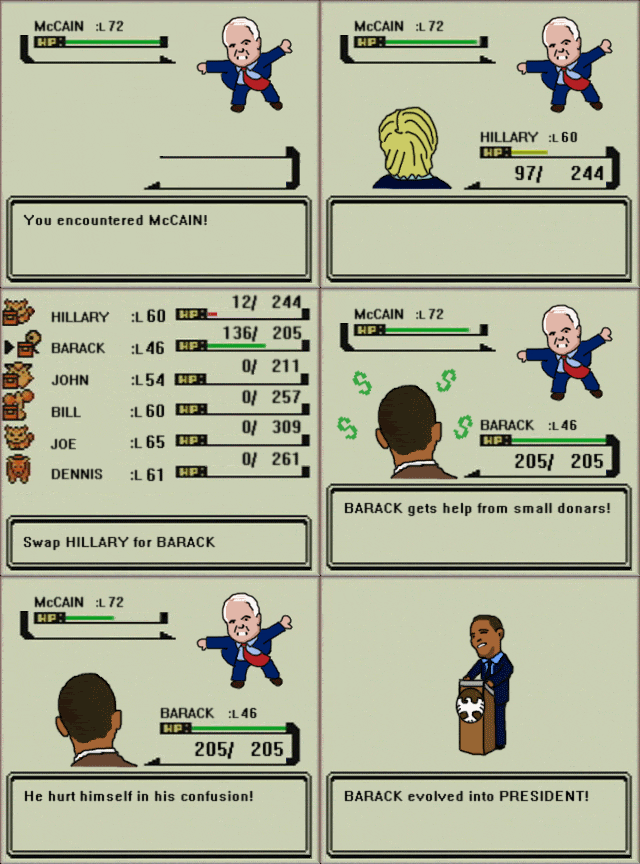
Here is a preview, a graphics interchange format (GIF), to demonstrate what political satire looks like:

This comment has been removed by the author.
ReplyDelete(I wish they would let you edit your own comments AFTER you post them.)
DeleteAnyway I was trying to say that you can embed gifs into your blog post using the "Insert Image" button in the post editor. It will ask you to "Select File" from there select "From URL" and paste the copied link in the search bar.
It should show you a preview of the GIF.
Also note that Blogger will not recognize the file as a GIF unless the URL ends in ".gif"
This link should work, all you have to do is copy and paste. I got it from the same site under the "Share" icon:
http://i.giphy.com/Ggjf8BfDA5rtm.gif
Thank you, Josh. It worked well and this is very helpful for future reference; I had no idea blogger could do this.
Delete